The web is entering a new phase where user privacy and fast performance matter more than any old tracking method. Third-party cookies, once the backbone of digital analytics, are now being blocked by browsers, restricted by laws, and rejected by users.
By 2025, going cookie-less isn’t just a technical upgrade. It’s a smart, future-proof choice that protects your business, respects your visitors, and keeps your data accurate.
Below are three strong reasons website owners are switching to cookie-less tracking — and why privacy-focused tools like YooAnalytics make this shift effortless.
1. Privacy Rules Are Getting Stricter
Privacy isn’t a trend. It’s becoming the new standard for how websites operate.
Regulations like GDPR in Europe and CCPA in California have forced businesses to rethink how they collect, store, and use personal data. Each year, the rules tighten. Consent pop-ups get more complex. Fines get larger. And the pressure on site owners keeps increasing.
Third-party cookies collect personal behaviour data across websites . which is exactly what these laws target. That’s why Chrome, Firefox, and Safari are all blocking them by default.
Going cookie-less removes almost all of that legal friction. You track what matters : page views, clicks, traffic sources, conversions — without invading anyone’s privacy.
Why it matters:
Fewer consent banners
Less legal risk
A more transparent visitor experience
Cookie-less tracking gives you clean, compliant data without the stress.
2. More Trust and Better User Experience
People are becoming more privacy-aware. They reject pop-ups. They install ad blockers. They avoid sites that feel “too tracking-heavy.”
When users know a website respects their privacy, they stay longer, explore more, and convert more often. A cookie-less approach helps you build that trust naturally.
Visitors don’t feel watched or followed. They simply browse comfortably.
This is where privacy-friendly analytics tools make a difference. Instead of relying on third-party scripts, YooAnalytics tracks essential behaviour directly on your website, with no personal data collection. That’s why it’s a strong option for WordPress users who want analytics that actually build trust, not break it.
Cookies aren’t just a privacy problem. They’re a performance problem.
Most third-party analytics tools load large JavaScript files from external servers. These scripts slow down your site, especially on mobile devices. Search engines now treat site speed as a major ranking factor, so even small delays can hurt your SEO.
Cookie-less analytics tools, especially local analytics, load directly from your server. That means:
No external script calls.
Fewer performance bottlenecks
Faster page load times
Better Core Web Vitals scores
A faster site doesn’t just rank higher, it makes visitors happier. And happier visitors take more actions.
Tools like YooAnalytics are built for this new performance-first world. They offer lightweight tracking that doesn’t bloat your pages or interrupt the browsing experience.
Final Thoughts
2025 is the year website owners finally shift away from outdated tracking methods. Cookie-less analytics offer privacy, speed, accuracy, and long-term compliance — all without sacrificing insight.
If you want to future-proof your WordPress site, switching to a privacy-friendly, self-hosted tool like YooAnalytics is one of the smartest moves you can make.
If you manage a WordPress site today, you’ve probably noticed a growing tension: You need analytics to understand your audience — but every script you add slows down your site and introduces additional privacy concerns.
For years, Google Analytics dominated the market. But the web is shifting. Browsers are blocking cookies, privacy laws are tightening, and website owners are looking for faster, cleaner, and more transparent ways to measure performance.
This is exactly why local analytics — sometimes referred to as self-hosted analytics — are becoming the new standard. Tools like YooAnalytics give you the insights you need without overloading your site or sharing data with third-party platforms.
Let’s explore the shift and why local analytics are becoming essential for WordPress users in 2025 and beyond.
Privacy Is Now a Ranking Factor — Literally
Search engines aren’t just checking keywords and backlinks anymore. They’re evaluating how trustworthy and user-friendly your site is.
Here’s what changed:
Modern browsers block third-party cookies.
Governments enforce strict privacy laws, such as GDPR and CCPA.
Users actively avoid sites that feel “track-heavy” or intrusive.
A 2024 survey found that 68% of users bounce from sites with aggressive tracking or slow load times. Google pays attention to that behavior — and it affects your rankings.
Privacy-friendly analytics help you stay compliant and build trust without sacrificing insights.
The Hidden Drawbacks of Cloud-Based Tracking
Tools like Google Analytics are powerful, but they come with issues that most people don’t talk about.
1. They Slow Your Site Down
External scripts load from remote servers. Each one adds milliseconds — and those milliseconds matter.
Google’s own study shows: A 1-second delay can reduce conversions by up to 20%.
2. You Lose Control of Your Own Data
With cloud tools:
Data is sent off your server.
You depend on third-party compliance.
You can’t fully control retention, security, or storage rules.
In a privacy-first world, that’s a real risk.
3. They Struggle in a Cookie-Less Web
By 2025, nearly all major browsers will block tracking cookies by default. Traditional analytics rely heavily on cookies, which means their accuracy is already dropping.
Why Local Analytics Are the Future
Local analytics solve all of these issues by processing data inside your own WordPress site, not on remote servers.
Here’s why more site owners are making the switch:
1. Faster Load Times
Because everything runs locally, there’s no:
Extra external scripts
Cross-server requests
Round-trip delays
Your pages load faster, and your SEO benefits instantly.
Many site owners report speed improvements of 20–40% after removing heavy analytics scripts.
2. True Privacy and Full Control
Your tracking data stays:
On your own hosting
Inside your own database
Fully under your rules
No third-party access. No external data transfer. No grey areas in compliance.
This makes local analytics naturally GDPR-friendly without cookie banners.
3. Accurate Tracking Without Cookies
Local analytics tools like YooAnalytics use modern methods such as:
Server-side logging
Anonymous fingerprinting
Session tracking without personal data
So even when cookies die, your insights stay sharp.
4. Made for WordPress Performance
Traditional analytics tools aren’t built specifically for WordPress. Local analytics plugins are.
YooAnalytics, for example:
Loads as a lightweight WP script
Doesn’t affect Core Web Vitals
Shows all reports inside your dashboard
Works with caching plugins and CDN setups
This performance-first approach makes a big difference for bloggers, businesses, and WooCommerce stores.
Real Example: How Local Analytics Improve SEO
Here’s what happens when a site switches from Google Analytics to local analytics:
Before
Loading GA adds ~150 KB of script.
PageSpeed score drops
Visitors bounce from slow pages.
Cookies trigger consent warnings.
After
No external requests
Faster page speed
Better user experience
Higher engagement and longer read time.
One WordPress store reported a 12% jump in organic traffic after removing heavy tracking scripts because Google rewarded the improved performance.
Why YooAnalytics Fits the Future of WordPress
YooAnalytics offers the benefits of local analytics without technical complexity.
You get:
Real-time traffic stats
Page-level insights
Referrer tracking
Device + location reports
Accurate visitor session data
Zero cookies
Zero external scripts
And everything runs inside your own website — no remote servers involved.
It’s the ideal solution if you want analytics without slowing down your site or compromising privacy.
Final Thoughts
The question is no longer “Should I use analytics?” The question is how you collect data without breaking privacy rules or harming your site’s performance.
Local analytics offer the best of both worlds:
Fast-loading pages
Clear, accurate insights
Full privacy control
Long-term compliance
Tools like YooAnalytics make this shift simple — and set you up for the privacy-first web that’s now becoming the norm.
Start tracking privately with YooAnalytics — your data, your rules.
FAQs: Local Analytics, Privacy, and WordPress
1. What are local analytics?
Local analytics are tracking tools that run directly on your own website instead of sending data to external servers. This means all visitor data stays inside your hosting environment, giving you faster performance and stronger privacy.
2. How are local analytics different from Google Analytics?
Google Analytics sends your visitor data to Google’s servers and relies on cookies. Local analytics tools process everything inside WordPress, load faster, and work without personal data. They’re more privacy-friendly and easier to comply with GDPR.
3. Why do local analytics improve website speed?
External analytics scripts take time to load and slow down your pages. Local analytics removes those scripts, which reduces external requests and helps improve Core Web Vitals — a key SEO ranking factor.
4. Are local analytics better for privacy?
Yes. Because no data leaves your website, you avoid third-party tracking concerns. You also reduce the need for cookie banners, consent pop-ups, and complex privacy policies.
5. Are local analytics accurate without cookies?
Modern local analytics use cookie-less tracking methods such as server logs and anonymous sessions. These methods work even when browsers block cookies, making them more reliable for 2025 and beyond.
6. Is a self-hosted analytics plugin safe for my site?
A well-built local analytics plugin is very safe. It stores data inside your WordPress database, giving you complete control over security, access, and retention.
7. Will a local analytics plugin work with caching or CDN?
Yes. Plugins like YooAnalytics are designed to work smoothly with caching, CDN services, and performance-focused setups commonly used on WordPress sites.
8. Does switching to local analytics help SEO?
Indirectly, yes. Faster site speed, better user experience, fewer pop-ups, and improved trust all contribute to better SEO. Many websites see higher engagement and reduced bounce rates after switching.
9. Do I still get useful reports without Google Analytics?
Absolutely. You can still track visitors, referrers, page views, device usage, time on page, and user journeys — all without relying on third-party servers.
10. Is YooAnalytics a good Google Analytics alternative for WordPress?
Yes. YooAnalytics is lightweight, privacy-friendly, and designed specifically for WordPress. It offers the essential stats you actually need without slowing down your website or sending data to external platforms.
If you’ve ever customized a WooCommerce store, you already know the checkout page can make or break conversions. It’s where customers decide whether to complete the purchase or abandon it. One of the smartest ways to improve checkout flow is by adding conditional checkout fields.
These fields appear only when they’re relevant for instance, showing a “Company VAT” field only when a customer selects “Business,” or asking for “Delivery Instructions” only if “Home Delivery” is chosen.
In this guide, you’ll learn exactly how to set up conditional checkout fields in WooCommerce both with a plugin and custom code so your store’s checkout feels smooth, personal, and efficient.
Why Conditional Checkout Fields Matter
Every extra field on your checkout page is friction. The more a customer has to fill out, the greater the chance they’ll drop off. But removing all extra fields isn’t the answer either. Sometimes you genuinely need more information, depending on the order type or shipping method
Conditional checkout fields strike the perfect balance. They show relevant options only when needed. For example:
Display “Company Name” and “Tax ID” only when the buyer chooses Business as the customer type.
Show “Delivery Date” and “Delivery Instructions” only when the customer selects Home Delivery.
Ask for “Gift Message” when the user checks Send as a Gift.
Hide all shipping-related fields when a digital product is in the cart.
This approach keeps your checkout clean, fast, and user-friendly without sacrificing important data collection.
Understanding WooCommerce Checkout Fields
WooCommerce organizes checkout fields into arrays such as billing, shipping, and order. Each field has its own properties like type, label, placeholder, required status, and priority.
Developers can modify these using filters like:
woocommerce_checkout_fields
This filter lets you add, remove, or change any field’s behavior. It’s the same system plugins use to offer more advanced customization.
Method 1: Using a Plugin (No Coding Required)
For most store owners, the easiest and safest way to create conditional checkout fields is by using a plugin. It requires no coding knowledge and can be managed directly from the WordPress dashboard.
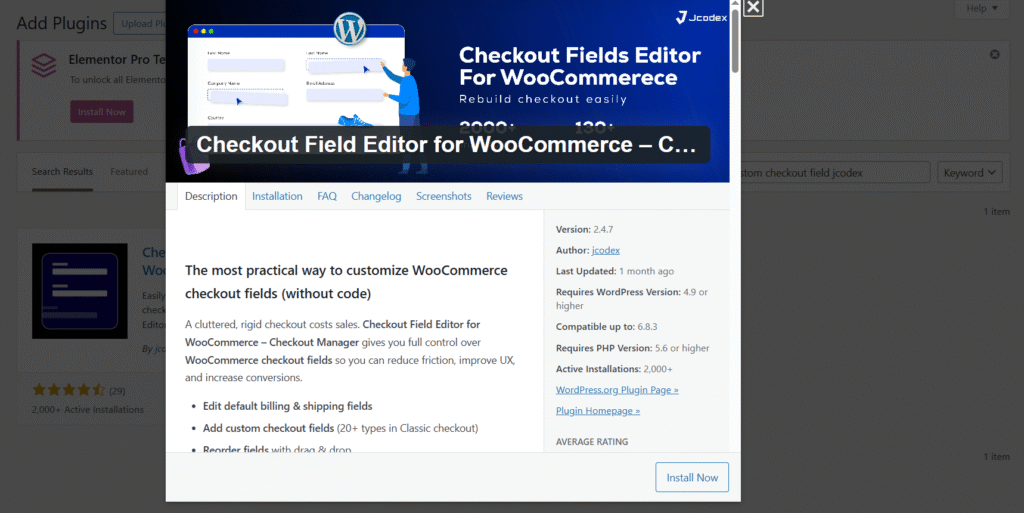
One reliable tool for this purpose is Checkout Field Editor for WooCommerce by Jcodex. It allows you to add, edit, and organize checkout fields visually and includes powerful conditional logic options.
Here’s how to set it up:
Step 1: Install and Activate the Plugin
Log in to your WordPress Dashboard.
Navigate to Plugins → Add New.
Search for “Checkout Field Editor for WooCommerce by Jcodex.”
Click Install Now, then Activate.
Once activated, you’ll find a new menu under WooCommerce → Checkout Fields.
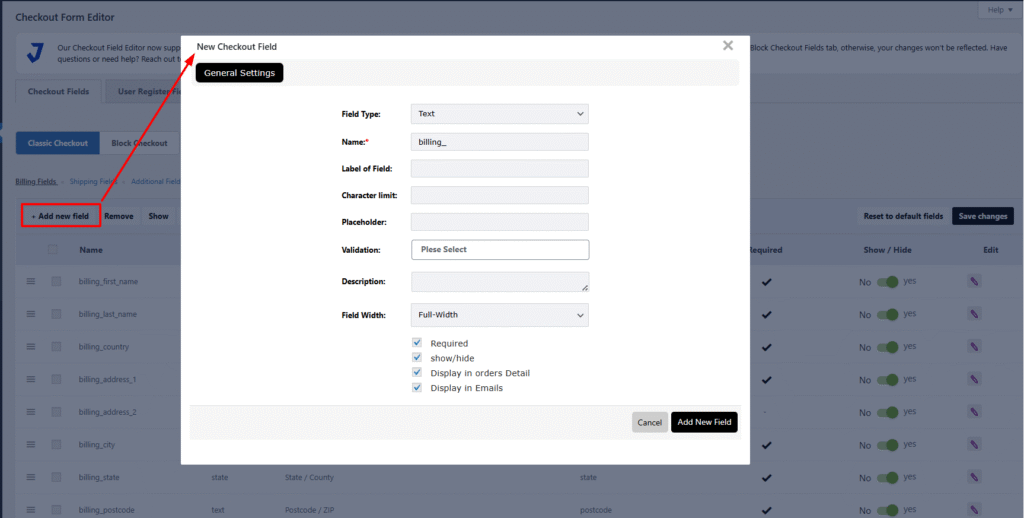
Step 2: Add a New Field
Go to WooCommerce → Checkout Fields.
Choose the section where you want the new field to appear Billing, Shipping, or Additional.
Click Add Field.
Enter the field label (for example, Delivery Date).
Select the field type text, date picker, checkbox, dropdown, etc.
Mark it as required or optional depending on your needs.
Click Save Changes to confirm.
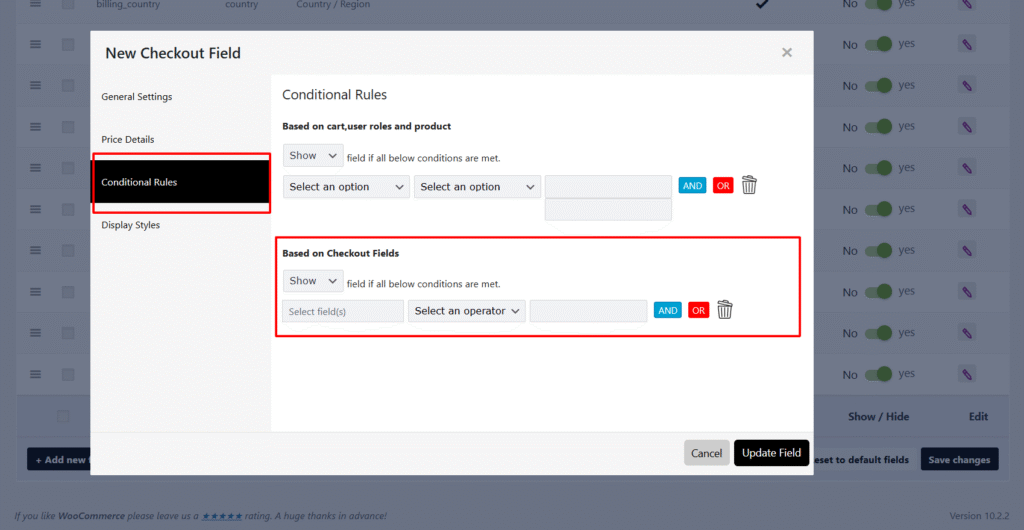
Step 3: Apply Conditional Logic
This is where the magic happens. You can control when a field appears based on what the customer selects.
For instance, if you want the Delivery Date field to appear only when a customer selects “Home Delivery”:
Edit the “Delivery Date” field you just created.
Scroll down to the Conditional Logic tab.
Enable “Display this field conditionally.”
Choose Condition Type → “Shipping Method.”
Set the rule: Show this field when Shipping Method = Home Delivery.
You can create similar conditions based on:
Selected Payment Method (e.g., show extra field only for “Cash on Delivery”).
User Role (e.g., wholesale vs. retail customers).
Cart Contents (specific products or categories).
Custom Checkboxes (like “Send as a Gift”).
Click Save Field, and the condition will automatically apply on the checkout page.
Step 4: Example Add a “Gift Message” Field
Let’s walk through one practical example. Suppose you want customers to write a message when sending a product as a gift.
Create a checkbox field called Send as a Gift.
Create a text area field called Gift Message.
In the Gift Message settings, enable Conditional Logic.
Add the rule: Show this field when “Send as a Gift” is checked.
Click Save Field, and the condition will automatically apply on the checkout page.
Step 4: Example Add a “Gift Message” Field
Let’s walk through one practical example. Suppose you want customers to write a message when sending a product as a gift.
Create a checkbox field called Send as a Gift.
Create a text area field called Gift Message.
In the Gift Message settings, enable Conditional Logic.
Add the rule: Show this field when “Send as a Gift” is checked.
Now when customers tick the “Send as a Gift” box, the Gift Message field instantly appears creating a clean, intuitive experience.
Step 5: Test and Preview
After setting everything up, visit your store’s checkout page and test the conditions. Try toggling the different shipping or payment options to confirm that fields show or hide correctly.
If something doesn’t work as expected, check for:
Theme conflicts
JavaScript caching
Missing field priorities or overlapping conditions
Once it works smoothly, you’ve got a professional, dynamic checkout system with no code required.
Method 2: Adding Conditional Fields with Code
For developers or technical store owners, adding conditional fields with PHP and JavaScript offers total flexibility.
Here’s a simple example. Let’s say you want an “Order Instructions” text area to appear only if the customer selects Local Pickup.
Add the following PHP code to your theme’s functions.php:
This script listens for changes in the selected shipping method and hides or shows the field accordingly.
You can expand this technique to other use cases such as specific products in the cart, logged-in user roles, or even custom payment gateways.
Saving Custom Field Data
If you’re adding fields manually, make sure the data is stored properly with each order. You can do this using the woocommerce_checkout_update_order_meta hook:
add_action('woocommerce_checkout_update_order_meta', 'save_custom_checkout_field');
function save_custom_checkout_field($order_id) {
    if (!empty($_POST['order_instructions'])) {
        update_post_meta($order_id, '_order_instructions', sanitize_textarea_field($_POST['order_instructions']));
    }
}
This ensures your custom data appears in the order details inside your WordPress dashboard.
When to Use Each Method
Both methods have their place:
Use the Plugin Method when:
You want a quick setup without coding.
Multiple team members manage your store.
You prefer a visual interface.
Use the Plugin Method when:
You’re comfortable with PHP or JavaScript.
You need advanced logic not supported by plugins.
You want to minimize plugin dependencies for performance.
If you’re running a complex store with frequent checkout updates, the plugin method will save you hours. But if you’re building a custom checkout flow for a client or want precise control, coding it yourself gives maximum flexibility.
Best Practices for Conditional Fields
Keep checkout simple. Only add fields that serve a clear purpose.
Test across devices. Make sure fields display correctly on mobile, tablet, and desktop.
Use clear labels and instructions. Avoid confusing users with vague field names.
Backup before changes. Always back up your site before editing checkout fields or adding new code.
Monitor performance. Too many conditions can slow down checkout; keep it optimized.
Final Thoughts
Conditional checkout fields make WooCommerce more flexible and customer-focused. By showing only the information that matters to each shopper, you streamline the process and improve conversion rates.
Start small, add one or two smart fields, test them with real users, and build from there. The goal isn’t just a “fancier” checkout; it’s one that feels effortless and intuitive to your customers.
When checkout feels natural, sales happen faster and happier customers come back again.
A few years ago, most of us didn’t think twice before adding Google Analytics to our websites. It was free, powerful, and easy to set up. But times have changed — and so have privacy laws, browser rules, and the way we think about data.
If you’re managing a website today, you’ve probably noticed how much harder it’s becoming to balance privacy, performance, and accuracy. That’s where local analytics step in — a cleaner, faster, and more privacy-friendly way to track what’s happening on your site.
Let’s break down what local analytics really are, why they matter, and how they can help your website grow.
So, What Exactly Are Local Analytics?
Think of local analytics as a self-hosted version of your tracking system. Instead of sending visitor data to big tech servers, everything stays right inside your own website — safe, private, and completely under your control.
When you use a tool likeYooAnalytics, all your tracking happens locally. No external scripts, no hidden cookies, no third-party data sharing. You still see who’s visiting, how long they stay, and what content works best — but without exposing your audience’s behavior to outside platforms.
In short, local analytics give you the same insights as Google Analytics, but with none of the privacy headaches.
Why Local Analytics Are a Big Deal in 2025
The shift toward privacy-first tracking isn’t just a passing trend. It’s becoming the new standard for how data should be collected online. Here’s why more website owners are making the switch:
1. Privacy Laws Are Tighter Than Ever
Regulations like GDPR and CCPA require websites to clearly explain what data they collect — and how it’s stored. The problem? Tools like Google Analytics often send data to servers in other countries, which makes compliance messy.
Local analytics fixes this. Because your data never leaves your site, you automatically reduce the risk of privacy violations.
Stat check: Nearly three out of four European users say they prefer browsing sites that don’t rely on tracking cookies (Statista, 2024).
2. External Scripts Can Slow Down Your Site
Every extra tracking script adds seconds to your page load time — and users notice. Google’s own research found that a one-second delay can cut conversions by 7%. That’s huge.
Local analytics runs right on your site, so it doesn’t have to “phone home” to another server. That means faster loading times, better user experience, and stronger SEO performance.
3. You Keep Full Control of Your Data
When you rely on third-party analytics, you’re basically giving your data away for free. Local analytics puts that control back in your hands. You decide what to collect, how to store it, and how long to keep it.
For business sites and online stores, that’s not just convenient — it’s a major competitive advantage.
4. The Web Is Going Cookie-Less
By the end of 2025, most major browsers will stop supporting third-party cookies. That means many old tracking methods simply won’t work anymore.
Tools like YooAnalytics are already ahead of the curve — built to work without cookies while still giving you accurate, real-time data.
How Local Analytics Help You Grow
Beyond privacy and speed, local analytics give you a clear picture of what’s working on your site — and what isn’t. You can:
See which posts attract the most readers.
Track where visitors come from and what they click next.
Understand how long they stay — and why they leave.
These insights help you create content that actually connects, not just ranks. It’s a smarter way to build an SEO strategy that feels human — not algorithmic.
Final Thoughts
The internet is clearly moving toward transparency, security, and user control. Local analytics fits perfectly into that vision. You get all the data you need to grow — without crossing any privacy lines or slowing down your site.
If you’re ready to move away from complicated tracking systems, YooAnalytics offers a clean, modern alternative made for WordPress users.
Your data stays yours. Your site stays fast. Your visitors stay protected.
FAQs:
1. What makes local analytics different from Google Analytics?
Local analytics tools store and process data directly on your own website, while Google Analytics sends it to Google’s servers. That means you stay in control of your visitor data.
2. Are local analytics more private?
Yes. Local analytics don’t share information with third parties. Everything stays within your own hosting environment, which keeps you compliant and builds user trust.
3. Will local analytics slow down my website?
No, it usually makes it faster. Because there’s no external script loading from another server, your pages load quicker and perform better.
4. Do I need cookies to track visitors?
No. Cookie-less tracking is one of the main benefits of local analytics. You can still get accurate visitor data without storing personal information.
5. Is this suitable for WooCommerce or business websites?
Definitely. Local analytics helps store owners track customer behavior — like cart activity and popular products — all while staying compliant.
6. Can beginners use YooAnalytics easily?
Yes. It installs like any regular WordPress plugin. Once activated, your dashboard shows visitor data instantly — no setup stress, no coding.
7. How does it help with SEO?
When you understand how visitors move through your site, you can focus on what works and fix what doesn’t. Local analytics gives you that insight in real time.
8. Is local analytics a long-term solution?
Absolutely. As browsers continue to block third-party trackers, local analytics is one of the few data tools built to last.
Great content isn’t written in isolation; it’s written with data. In 2025, search engines will reward websites that truly understand their audience. But how can you know what your readers want without reliable analytics?
The answer lies in accurate, privacy-friendly tracking. With tools like YooAnalytics, WordPress site owners can measure exactly how visitors interact with their content — and use those insights to improve SEO performance.
In this blog, we’ll explore how accurate analytics drive better writing, smarter SEO strategies, and more organic traffic.
Why Accuracy in Analytics Matters
Most marketers make content decisions based on assumptions, not evidence. They guess which keywords to target, which posts perform best, or what keeps readers engaged.
But inaccurate or incomplete data leads to poor optimization.
In fact:
Studies show that over 40% of analytics reports are affected by data loss due to cookie restrictions or ad blockers.
As browsers continue to phase out tracking cookies, traditional tools like Google Analytics often miss 20–30% of visitors.
That’s a big gap — especially when every click and scroll tells a story about your readers.
A privacy-friendly analytics tool like YooAnalytics solves this by collecting data directly on your WordPress site, ensuring accurate insights without depending on third-party cookies or scripts.
The Link Between Analytics and SEO Success
SEO isn’t just about keywords anymore; it’s about user experience. Google’s ranking systems in 2025 focus heavily on user intent, engagement, and satisfaction signals.
Accurate analytics help you:
Identify what your audience truly wants.
Measure how long they stay and what they read.
Spot which pages bring the most organic traffic.
See what’s stopping them from engaging or converting.
By understanding behavior, you can optimize both your content strategy and SEO execution.
1. Track Reader Engagement
With YooAnalytics, you can see exactly how users interact with your posts — from the time spent on each page to scroll depth.
What to look for:
Average time on page: Longer time = engaging content.
Bounce rate: High bounce rate may mean irrelevant or low-quality content.
Scroll depth: Shows how much of your post users actually read.
How to use it for SEO:
If users drop off after the first few paragraphs, your intro may not be strong enough. Improve your hook, add visuals, or use subheadings to keep readers engaged.
Search engines interpret higher engagement as a sign of quality, boosting your rankings.
2. Analyze Traffic Sources
YooAnalytics tells you where your readers come from — search engines, social media, referrals, or direct visits.
How this helps:
Organic traffic: Optimize for keywords and topics that already attract visitors.
Social traffic: Repurpose top-performing content for platforms like LinkedIn, X, or Pinterest.
Referral traffic: Build partnerships with the websites linking to you.
Knowing which source brings engaged visitors helps you invest in the right channels for growth.
3. Identify Top-Performing Pages
Every website has “hero pages” — those that bring in the most views, backlinks, or conversions.
YooAnalytics helps you easily spot them. Once you know your winners:
Update them regularly with fresh stats or insights.
Add internal links to newer or related posts.
Repurpose them into other formats (videos, infographics, podcasts).
According to HubSpot, updating and republishing old content can increase organic traffic by 106% — but only if you know which posts to focus on.
4. Understand Keyword Intent Through Behavior
Analytics reveal more than just numbers — they reveal intent.
If a page ranks well but has a high bounce rate, visitors might not be finding what they expected. Adjust your content to match their search intent more closely.
For example:
Informational searches: Add how-tos, definitions, or step-by-step explanations.
Transactional searches: Highlight products, CTAs, and value propositions earlier.
YooAnalytics gives you engagement metrics to understand how well your content meets user expectations.
5. Improve Internal Linking
Analytics show how readers move from one page to another. If they consistently exit after one article, you might be missing internal links.
By tracking click paths, you can:
Add relevant links where readers drop off.
Create content clusters that connect related posts.
Guide users deeper into your site, reducing bounce rates.
A solid internal linking structure not only improves engagement but also strengthens your SEO through better crawlability.
6. Measure Content Conversions
Good content doesn’t just attract readers — it converts them.
With YooAnalytics, you can track:
Newsletter sign-ups
Product clicks
Lead form submissions
WooCommerce checkouts
By knowing which pages drive the most conversions, you can prioritize those topics and styles for future content.
Data-backed decisions lead to better ROI on your content marketing.
Why Use YooAnalytics for Content Insights
Here’s why YooAnalytics stands out for content creators and SEO writers:
Accurate tracking: Works without cookies or third-party interference.
Real-time data: See what’s happening on your site right now.
WooCommerce integration: Track conversions from blog to checkout.
Lightweight and private: No slowdown, no data sharing.
Simple reports: Clear insights directly inside your WordPress dashboard.
It’s built for WordPress users who want to write smarter — not guess.
Real Example: Turning Data into Better Content
Let’s say your blog on “Email Marketing Trends” gets lots of clicks but low engagement. YooAnalytics shows visitors spend only 20 seconds on the page.
After analyzing behavior, you realize the intro doesn’t match the title — readers expected actionable tips, not theory. You update the post with clear strategies and visuals.
Within a month, dwell time doubles, bounce rate drops by 30%, and your article climbs to the top 3 search results.
That’s the power of accurate, behavior-driven insights.
Action Plan: Use YooAnalytics to Write SEO-Optimized Content
Set up YooAnalytics on your WordPress site.
Track engagement — time, bounce rate, scroll depth.
Analyze traffic sources and focus on the ones that perform best.
Update top pages with fresh keywords and improved UX.
Monitor conversions from content to action.
Repeat monthly and refine your SEO strategy.
Consistency is key — over time, small data-backed improvements lead to massive traffic gains.
Conclusion
Accurate analytics are your secret weapon for writing content that ranks and converts. By understanding real user behavior, you stop guessing what works — and start knowing it.
YooAnalytics gives you that power: fast, private, and precise tracking built right into WordPress.
It’s more than analytics — it’s your roadmap to SEO success and audience growth in 2025 and beyond.
Running a WooCommerce store without tracking key analytics metrics is like flying blind. Suppose you want to grow your business, increase conversions, and understand your customers better. In that case, you need to rely on WooCommerce analytics metrics that reveal what’s working—and what’s not.
In this blog, we’ll cover the top 5 WooCommerce analytics metrics every store owner should monitor and how they can help you make smarter decisions.
1. Conversion Rate (CR)
Why it matters:
The conversion rate indicates the percentage of visitors who actually make a purchase. It’s the most important metric for understanding your store’s performance.
Formula:
Number of Purchases ÷ Number of Visitors) × 100
What’s a good benchmark?
According to IRP Commerce, the average eCommerce conversion rate is around 2.5% to 3%, but this varies by industry.
How to improve it:
Simplify your checkout process
Offer limited-time deals
Use abandoned cart recovery emails
Use tools like YooAnalytics to identify where users drop off
2. Average Order Value (AOV)
Why it matters:
Your AOV tells you how much customers are spending per transaction. Increasing AOV means more revenue without increasing traffic.
Formula:
Total Revenue ÷ Number of Orders
Benchmark:
AOV varies, but for WooCommerce stores, a range between $50–$100 is common.
How to improve it:
Upsell and cross-sell products
Offer free shipping on orders over a certain amount
Bundle related products
3. Customer Lifetime Value (CLV)
Why it matters:
CLV helps you understand how much a customer is worth to your business over time. This is vital for setting budgets for ads and retention strategies.
Formula:
Average Order Value × Purchase Frequency × Customer Lifespan
Fun stat:
According to Shopify, increasing customer retention by just 5% can increase profits by 25% to 95%.
How to improve it:
Use email marketing to retain buyers
Offer loyalty programs or VIP discounts
Use analytics to identify high-value customer segments
4.Cart Abandonment Rate
Why it matters:
It tells you how many users leave your site after adding products to their cart. According to the Baymard Institute, the average cart abandonment rate is 69.99%.
Formula:
(Number of Abandoned Carts ÷ Total Carts Created) × 100
How to reduce it:
Add exit-intent popups
Offer discount codes on cart exit
Use real-time analytics tools like YooAnalytics to monitor abandonment in your checkout journey
5.Traffic Sources & Search Keywords
Why it matters:
Understanding where your traffic comes from—Google, social media, email, or referrals—helps you focus on the most effective channels. Also, analyzing search engine keywords helps you optimize content and product pages.
What to track:
Organic vs. paid traffic
Top referral sites
Top search queries bringing users to your store
How to improve SEO traffic:
Target long-tail keywords in product descriptions
Create content around top-performing keywords
Monitor with tools like YooAnalytics (self-hosted & privacy-friendly)
Why Use a Plugin Like YooAnalytics?
Unlike Google Analytics, which shares your data with third parties, YooAnalytics is a self-hosted WordPress analytics plugin designed specifically for WooCommerce stores. It helps you track all five of these essential metrics without compromising privacy—and without the complexity.
Key features include:
WooCommerce purchase journey tracking
Checkout step analysis
Real-time traffic monitoring
Search engine keyword tracking
GDPR-friendly, no data leaves your server
Final Thoughts
Tracking your store’s performance through WooCommerce analytics metrics is the foundation of smart eCommerce growth. Whether you’re looking to improve conversion rates, boost revenue, or reduce cart abandonment, these five key metrics provide the insights you need.
Don’t guess—track, analyze, and grow.
Get started with YooAnalytics today and take full control of your WooCommerce store’s data.
In a world where data privacy is more important than ever, website owners are turning to self-hosted analytics solutions as a safer, more transparent alternative to third-party tools like Google Analytics. But what exactly is self-hosted analytics, and why is it becoming a popular choice in 2025?
In this blog post, we’ll break down the concept of self-hosted analytics, explore its benefits, and share some of the best tools available this year.
What Is Self-Hosted Analytics?
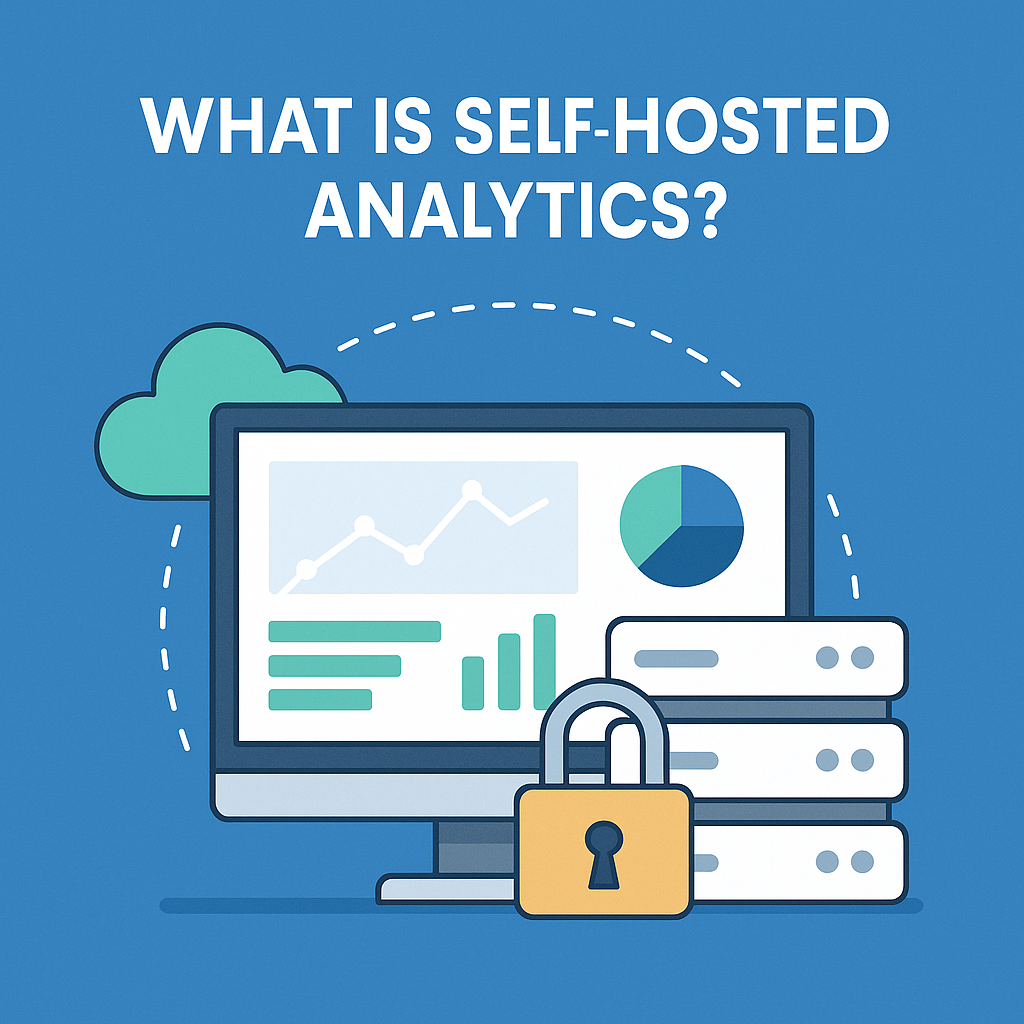
Self-hosted analytics refers to software that you install and run on your own server or hosting environment. Unlike third-party analytics tools that collect and store user data on external servers (like Google Analytics), self-hosted tools keep all your visitor data on your own infrastructure.
This means you have full ownership and control over the data collected, how it’s stored, and who has access to it.
Benefits of Self-Hosted Analytics
1. Full Data Ownership
Your data stays on your server. You don’t share sensitive visitor information with third parties or large tech companies.
2. Enhanced Privacy Compliance (GDPR, CCPA, etc.)
Because you’re not sending data to external platforms, it’s easier to comply with privacy regulations like GDPR, CCPA, and PECR.
3. No Data Sampling
Many third-party tools use sampled data to reduce load, which can result in inaccurate reporting. Self-hosted analytics gives you raw, unfiltered data.
4. Faster Load Times
By removing external scripts, you reduce page weight, improving your website’s speed and SEO performance.
5. Customization
With self-hosted tools, you can often modify the codebase, add custom events, or integrate deeply with other systems.
Best Self-Hosted Analytics Tools in 2025
YooAnalytics
Best for WordPress & WooCommerce users
100% privacy-focused, no third-party scripts
Real-time visitor tracking
Seamless WooCommerce integration
Quick setup, no coding required
Matomo
Feature-rich with dashboards, goals, heatmaps, and more
GDPR-compliant
It can be hosted on your server or cloud.
Plausible Analytics
Lightweight and fast
Clean UI and open-source
Great for bloggers and small businesses
Is Self-Hosted Analytics Right for You?
If you’re concerned about data privacy, transparency, or regulatory compliance—or if you simply want more control over your website’s insights—then self-hosted analytics is a smart move.
For WordPress and WooCommerce users, YooAnalytics offers the perfect balance of simplicity, privacy, and functionality.
Final Thoughts
As we move further into 2025, user privacy is no longer optional—it’s expected. With self-hosted analytics, you gain better performance, full transparency, and a trusted relationship with your users.
Take control of your data today. Choose a self-hosted analytics solution that aligns with your values—and your goals.
We’re beyond excited to share that YooAnalytics has officially crossed 20+ active installs! What started as a simple idea to provide privacy-focused website analytics is now being trusted by users around the world—and we couldn’t be more grateful.
What This Means
Reaching 20+ active users is a strong signal that website owners want a clean, lightweight, and secure alternative to traditional analytics platforms like Google Analytics. YooAnalytics gives users full control over their data without compromising on insights or performance.
Why Users Love YooAnalytics
No third-party tracking – Total privacy and GDPR compliance
Real-time visitor tracking – See what’s happening on your site right now
WooCommerce-ready – Get powerful eCommerce insights effortlessly
Self-hosted and open – You own and control all your analytics data
What’s Coming Next
This milestone is just the beginning. We’re working on exciting updates, including:
Custom event tracking
Advanced geolocation reports
Visual dashboard enhancements
Deeper WooCommerce checkout analytics
Thank You!
To all our early adopters—thank you for believing in our vision. Your feedback and support are helping shape the future of private, independent website analytics. We’re building this with you and for you.
In today’s data-driven world, tracking your WooCommerce sales is non-negotiable. But do you really need Google Analytics, Meta Pixel, or third-party SaaS dashboards just to know how your store is doing?Not at all.
In this in-depth guide, you’ll learn exactly how to monitor, analyze, and optimize your WooCommerce sales without relying on external tools—using only your WordPress dashboard, built-in features, and privacy-first plugins.
Why Track Sales Without External Tools?
Many WooCommerce store owners are switching to in-house tracking for good reasons:
Privacy & Compliance: Avoid GDPR, CCPA, and cookie consent banners.
Data Ownership: Keep full control of your store’s sensitive customer data.
Site Speed: Third-party scripts can slow down your website—especially on mobile.
Simplicity: Manage everything inside your WordPress admin panel.
Whether you’re privacy-conscious or just want a leaner setup, this guide is for you.
What You Need: No APIs, No External Scripts
To track WooCommerce sales without third-party tools, you’ll be using a mix of:
WooCommerce’s built-in Analytics and Reports
Self-hosted plugins like YooAnalytics
Custom order management tricks
Dashboards and visual reports inside WordPress
Let’s break it all down.
1. Use WooCommerce’s Built-in Analytics Tools
Starting with WooCommerce 4.0, a powerful analytics dashboard is available under WooCommerce > Analytics.
Key Features:
Revenue Breakdown: See gross and net sales, refunds, and taxes.
Orders Overview: Track successful, failed, or pending orders.
Product Performance: Know your best and worst-selling products.
Customer Insights: Analyze returning vs. new customers.
Conversion Funnels: View purchase trends across time.
Filter by Date Range, Product, or Category
You can even export the data as a CSV for offline analysis.
Use the “Compare to Previous Period” tool to spot seasonal dips and growth trends.
2. Activate the “WooCommerce > Reports” Module (Legacy but Useful)
Don’t overlook this classic tool under WooCommerce > Reports.
What it includes:
Sales by Date
Sales by Product or Category
Top Coupons Used
Customer Purchase Totals
Tax and Shipping Reports
While less flashy than WooCommerce Analytics, it’s lightweight and effective.
3. Use a Self-Hosted Analytics Plugin (YooAnalytics)
To gain deeper visitor insights (beyond just orders), you can install a privacy-focused analytics plugin like YooAnalytics.
No signup, no API key, no tracking code from Google or Meta.
YooAnalytics is perfect for users who want Google Analytics-style charts but are hosted directly inside WordPress.
4. Track Orders with Custom Order Statuses & Notes
Use WooCommerce’s Order Status Manager to create custom statuses, such as:
“First-time Buyer”
“Referral Order”
“Manual Payment Verified”
Combine this with order notes to:
Record why a customer canceled
Mark repeat purchases
Add internal comments for staff or CRM
Use the Orders page filters to track performance by status or note.
5. Monitor Performance with WordPress Dashboards
If you want a high-level snapshot of store health:
Use admin dashboard widgets.
Plugins like “WooCommerce Dashboard Widgets Stats” or “Advanced WooCommerce Reporting” provide visual, customizable blocks.
Set up alerts or charts for:
Daily/weekly revenue
Abandoned orders
Stock levels of popular products
FAQ: Tracking WooCommerce Sales Privately
Can I still see sales funnels without Google Analytics?
Yes! Plugins like YooAnalytics and built-in WooCommerce reports show step-by-step purchase behavior, including checkout drop-offs.
Are self-hosted analytics plugins accurate?
Absolutely. In fact, they can be more accurate because they don’t rely on blocked cookies or ad blockers—especially YooAnalytics.
Is this setup GDPR compliant?
Yes. Since no external data sharing or cookies are involved, your store is compliant by default—though it’s always best to consult with a legal advisor.
Conclusion: Own Your Data, Own Your Sales
Tracking WooCommerce sales doesn’t have to mean giving your data to Big Tech. With the power of built-in tools and smart plugins like YooAnalytics, you can:
Analyze real-time sales data
Optimize product performance
Improve customer retention
Stay 100% private and compliant
It’s time to simplify your stack, speed up your site, and take back control.
Ready to Go Private?
Install YooAnalytics or use the built-in WooCommerce Analytics module today and start tracking sales the smart, privacy-first way.
We’re thrilled to announce a major milestone—YooAnalytics has officially surpassed 10+ active installs! This is just the beginning of our journey, and we couldn’t have done it without our amazing early adopters who believe in privacy-focused, self-hosted analytics.
Why This Milestone Matters
Reaching 10+ active installs means that website owners are actively seeking an alternative to traditional tracking tools like Google Analytics. With YooAnalytics, users get:
100% privacy-friendly analytics – No third-party tracking or data sharing.
Real-time visitor insights – See who’s on your site without delays.
WooCommerce-ready tracking – Optimize your store’s conversions effortlessly.
Unlimited tracking with full data ownership – Your data stays where it belongs—with you!
What’s Next for YooAnalytics?
We’re just getting started! Here’s a sneak peek at what’s coming: Advanced Geolocation Tracking – Understand where your visitors are coming from.
Enhanced WooCommerce Analytics – Gain deeper insights into checkout behavior.
Customizable Reports & Dashboards – Get the data that matters most to you.
A Heartfelt Thank You
To everyone who has installed, tested, and supported YooAnalytics—we appreciate you! Your feedback is shaping the future of privacy-first website tracking. If you haven’t tried it yet, now is the perfect time to join us.